"Every text box on the internet will get an LLM." — Steven Sinofsky
Prologue
I thought that it would be fun to build an AI that can help me manage my bookmarks. Keep reading if you are interested in how deceivingly simple such a project can be.
What started as a weekend project ended up utilizing several technologies and techniques that are considered "state-of-the-art" in the LLM space (although the definition of state-of-the-art changes literally every day in this domain) such as: LangChain, prompt frameworks, application-specific LLMs, Retrieval Augmented Generation and SmartLLMChain. So if any of that sounds interesting, read on…
The Problem
I like keeping a record of interesting articles, products, travel destinations, recipes, books, design inspirations etc. on the web. As a result, I use the bookmarks feature often. Out of box, browser support for bookmarks is pretty basic. In the past I have tried using several different tools to replace the browser feature but I ended up with a super fragmented and ultimately unmanageable collection. All the tools require a subscription and to some extent effort in order to keep the information organized. Furthermore, transferring data between those tools is hard or simply impossible, which means that you need to remember where you saved what and it's a pain using different tools for different projects. As a consequence, I'm going through phases of trying different tools but I always end up just making new folders in Chrome, which at least saves me from the lock-in. The result, is a library of >1000 bookmarks and clippings which is practically too hard to navigate, consolidate or just clean-up.
There are tons of companies trying to solve this problem with or without Gen AI but I don't love any of them. So, in conclusion, this felt like a really nice problem to solve using Gen AI.
The Concept
In order to save myself from at least having to look at different places, I end up saving loads of bookmarks in Chrome. As a result, I always end up having to spend time keeping my library organized. If I don't, which is more often than not, eventually it grows out of control and it gets harder and harder to use because items get misplaced, mislabelled or perhaps I cannot remember the exact keywords/tags. If I had a magic wand, I would imagine being able to have conversations like the following:
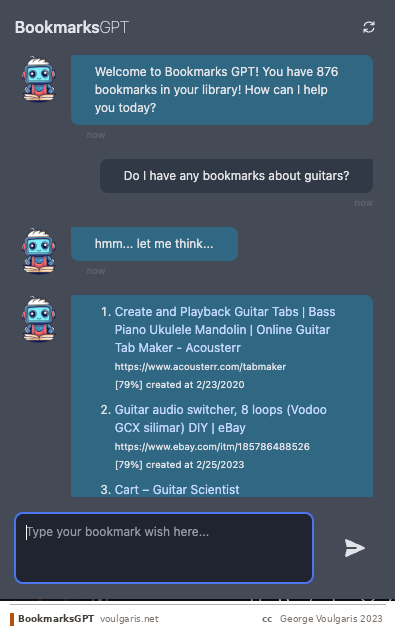
User: Search for bookmarks related to programming
AI Assistant: I found the following bookmarks related to "programming":
- Programming 101 — https://www.programming101.com
- Codecademy — https://www.codecademy.com
- Stack Overflow — https://stackoverflow.com
The system can allow a user to perform any kind of bookmark-related operation using a chat interface. The list of possible operations may include create, edit, delete, search, update, download, open, share, check for "dead" links, search within websites within bookmarks. Operations could equally be associated to a single or multiple bookmarks.
In short, what I want to do is to be able to organize my bookmarks, search my bookmarks, and retrieve/analyze information contained in the bookmarked pages. All that without having to be locked in yet-another-app.
Functional Requirements in a nutshell:
- Bookmark Organization — Search bookmarks using natural language queries. Organize bookmarks through chat interface. Compare different versions/updates of bookmarked pages.
- Content Analysis — Retrieve and analyze information from bookmarked pages. Generate summaries and insights. Track metadata (creation date, last visited).
- User Interface — Chat-based interface for all interactions. Support for multi-turn conversations. Ability to refine search results progressively.
Handling Conversations
The system should be able to perform actions described across multi-turn conversations with the user. For example, a user trying to narrow down a list by progressively refining her request:
User: Show me bookmarks added last month.
AI Assistant: Here are the bookmarks you added last month:
- News Portal — https://www.news.com
- Online Shopping — https://www.amazon.com
- Recipe Blog — https://www.foodblog.com
User: Refine the search to show bookmarks with the keyword "news".
AI Assistant: I found one bookmark from last month with the keyword "news":
- News Portal — https://www.news.com
Handling Data Analysis
Let's push this a bit further and imagine a system which can help you act on this information:
- Provide suggestion by analyzing metadata information about the results: e.g. which of those bookmarks is the most recent.
- Provide suggestion by analyzing the content of the bookmarked documents: e.g. "which of those recipes does not require milk and takes less than 10 minutes?"
- Provide suggestion by using the content of the bookmarks.
- Perform an action based on the results: e.g. "find all broken links and delete them" or "open the most recent bookmark."
Conversational Flow for the Assistant
With these requirements in mind, here's how the assistant should handle a hypothetical user question:
- User sends a message
- Assistant analyzes — decides if the message contains a keyword, filtering, or an action, also taking into account messages in the conversation so far.
- Assistant creates suggestions — one or more possible action suggestions based on the analysis.
- Disambiguation — if there is ambiguity, the assistant asks for clarification.
- Execution — executes the action (if non-transformative) or asks for user confirmation (if transformative).
- Operating on bookmarks — if the action involves operating on bookmarks already mentioned, execute and provide feedback.
- Retrieving bookmarks — if the action involves retrieval, generate a database query including any filters specified during the conversation.
- Execute the query for relevant bookmarks.
- Create a prompt incorporating the results and conversation context.
- Generate a response — potentially evaluating multiple responses for quality.
- Parse and compile the response message(s).
- Update the conversation thread and context.
Product Roadmap
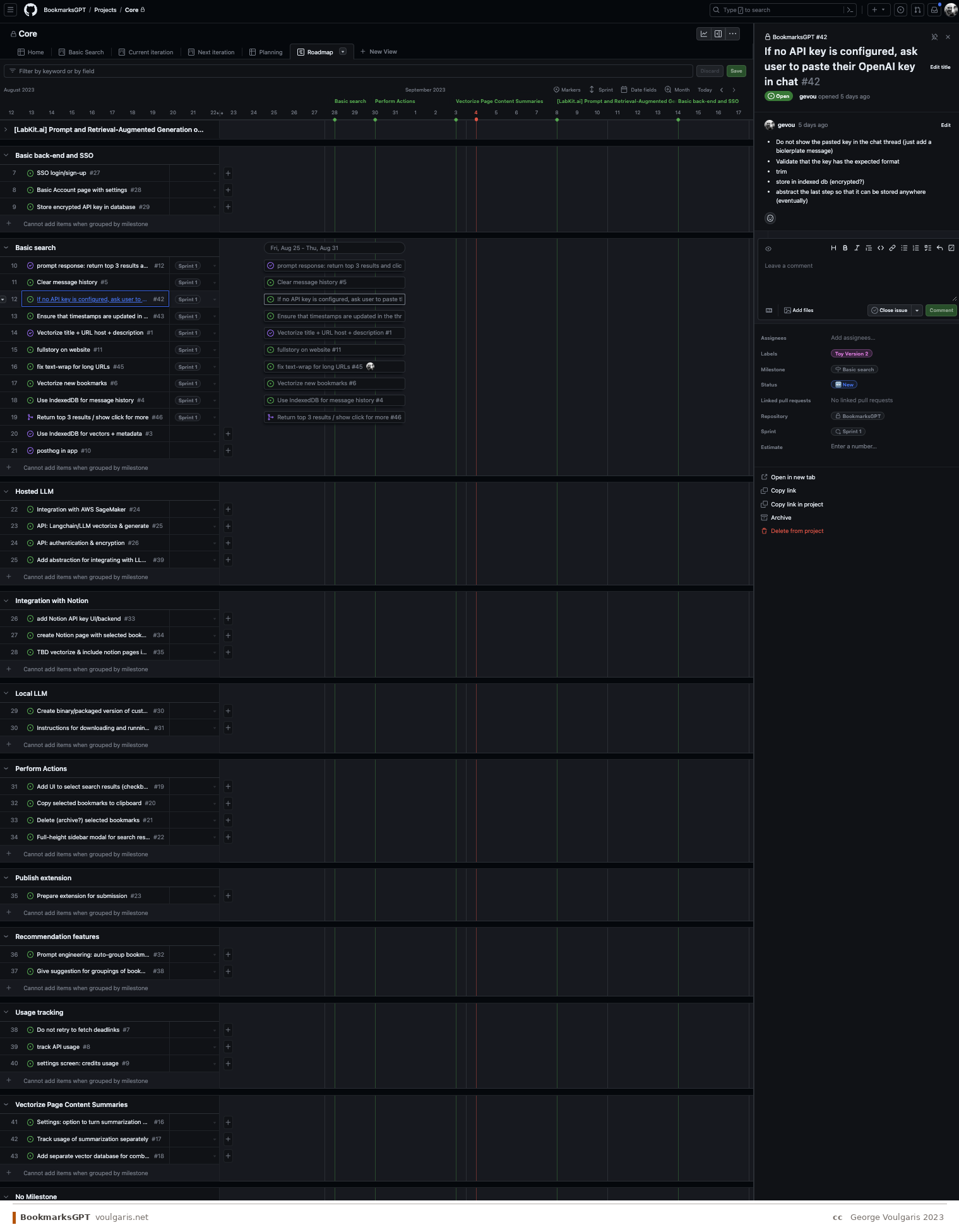
Given the timeframe and complexity, I prioritized balancing effort vs. impact vs. time-to-market:
- The system returns relevant and accurate results based on keywords and context with a single prompt.
- The system can accurately filter results based on metadata with a single prompt.
- The system can refine results based on multi-turn conversations.
- The system can analyze the results and generate useful insights or recommendations.
- The system will attempt to disambiguate requests by asking follow-up questions.
- The system can perform operations on selected bookmarks through the chat interface.
Constraints
- Time — Usable version within 4-6 weeks calendar time (roughly one week of actual effort).
- GTM — Chrome extension for easy distribution. Users need to add their own OpenAI API key for the free version.
- Cost — Free version without eating LLM costs. Paid version should be credit-based pay-as-you-go, not subscription.
- Distribution — Chrome extension constraints (UI size, package size, storage).
Part 1: Use GPT to Search Your Own Data
The birth of BookmarksGPT
A Few Words About Retrieval Augmented Generation
Retrieval Augmented Generation (RAG) is a technique that combines the generative capabilities of LLMs with the ability to retrieve relevant information from a knowledge base. Instead of relying solely on what the LLM learned during training, RAG first searches a database for relevant documents and then includes those documents in the prompt, allowing the LLM to generate responses grounded in specific, up-to-date information. This is the core architecture that powers BookmarksGPT.
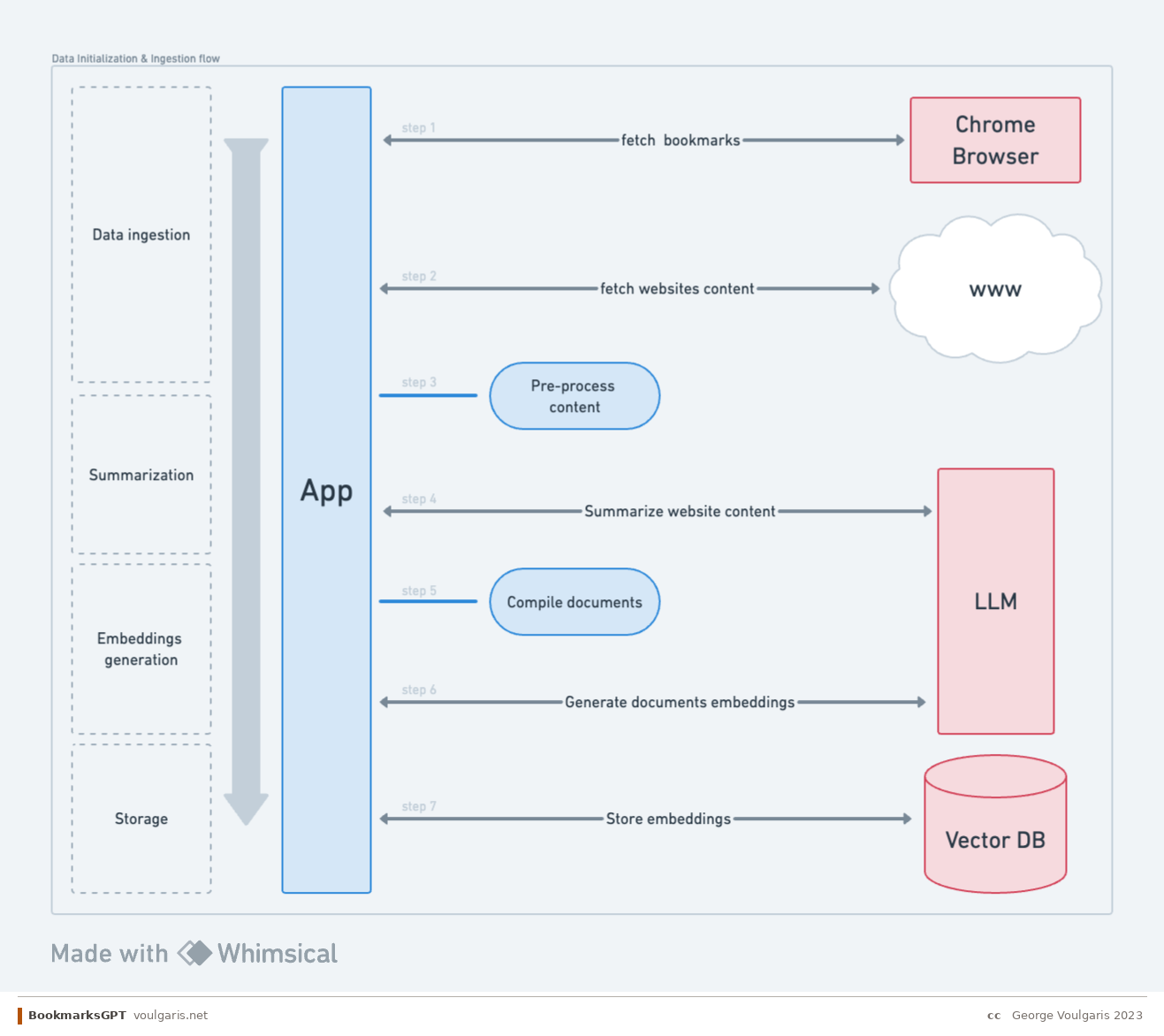
Ingestion Flow
Data ingestion & searching — The fundamental question is: how can we store the most relevant information with the smallest footprint? The challenge is that bookmark data is wildly inconsistent. Some titles have zero context about the actual page content, while some URLs are more descriptive. Some websites include useful descriptions in their metadata, but many don't. Even when you can parse a website's text, the content may be too long to summarize in a single LLM call. The ingestion pipeline needs to handle all of these edge cases gracefully, combining URL, title, description, and page content to produce a meaningful representation of each bookmark.
Summarization — Summarizing long web pages presents two key challenges. First, splitting content into chunks that preserve meaning is tricky and often hit-or-miss. Second, the cost of LLM API calls for summarization adds up quickly when processing hundreds of bookmarks.
Embeddings generation — Once content is summarized, we need to generate vector embeddings for semantic search. Key decisions include the choice of embedding model (which affects both performance and cost), storage and ingress costs for the vector database, and how to construct the document that gets embedded. This last point is essentially reverse prompt engineering — figuring out the optimal text representation that will yield the most relevant search results.
Storage — The storage layer needs to balance speed and cost. Beyond the vector embeddings themselves, we need to store metadata — creation dates, last visited timestamps, folder paths, and other attributes — that users may want to filter against.
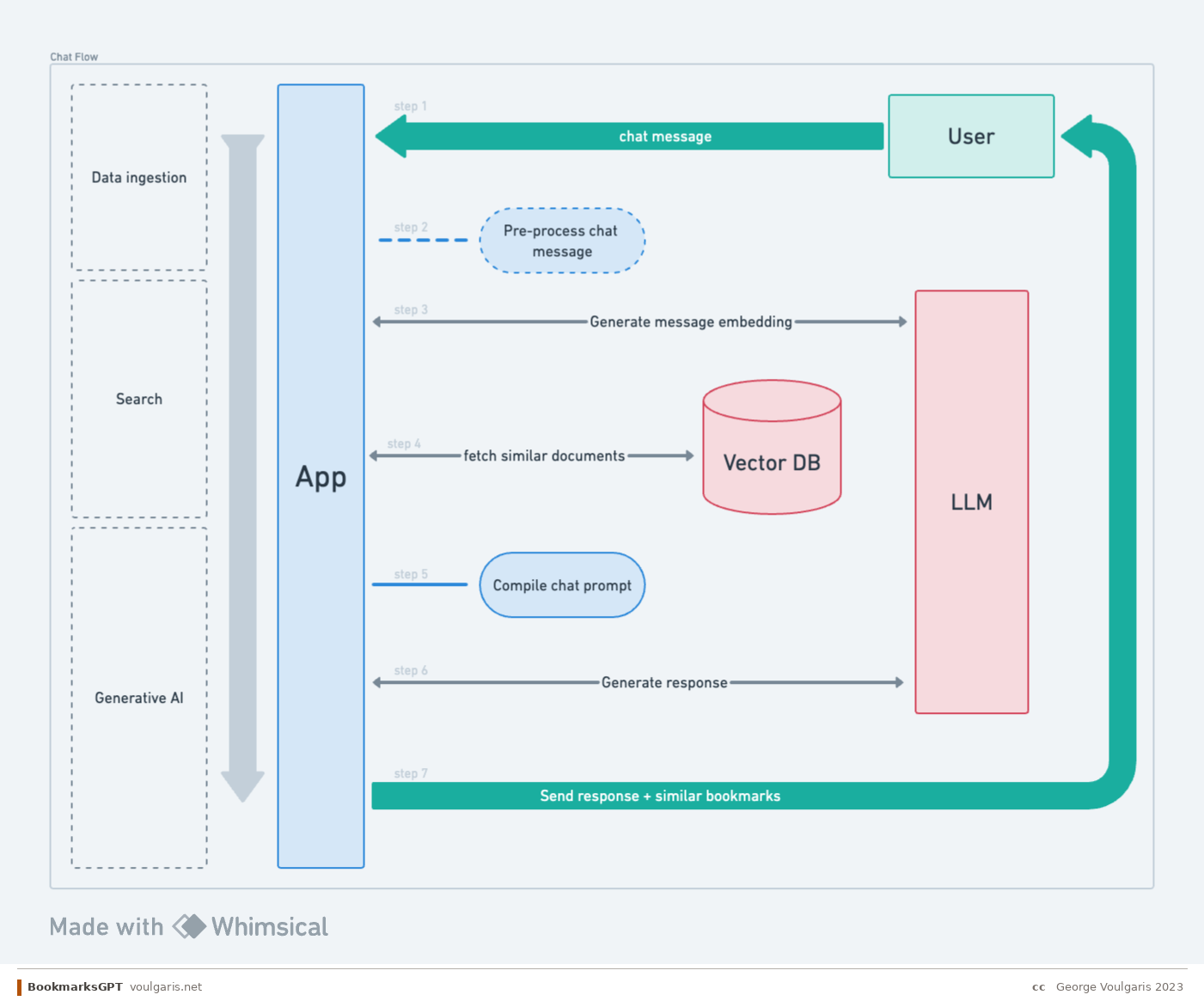
Conversational AI Flow
Query — People expect to talk to the system the way they talk to ChatGPT. That means the user might type a command, a question, a single keyword, or a random phrase. The challenge is that the same input can have different significance depending on the mode: for search, a keyword is more useful; for chat, the system needs to understand or guess the broader context.
Search — An important distinction: RAG is not the same as simply finding relevant documents. The search strategy itself involves multiple decisions. Should we use pure vector search (semantic similarity), BM25 (keyword matching), or a hybrid approach? The embedding model used for queries must match the one used during ingestion. And then there's the question of thresholds — how similar is "similar enough"? In some cases, using an LLM for search might even be overkill compared to well-tuned traditional search.
Generative AI — Creating the right prompt for the response generation step is tricky. The system needs to summarize search results in a way that highlights what's actually important to the user. There's also the question of post-processing the LLM's output before sending it to the user, and maintaining historical context across the conversation.
Takeaways and Next Steps
What We've Covered
Building an AI-powered bookmarks manager sounds simple on the surface but quickly reveals the core challenges of productizing LLM-based features. The key insight is that the real complexity isn't in any single capability — it's in orchestrating multiple LLM interactions (intent analysis, search, summarization, response generation) within the constraints of context windows, cost, and latency. Every step in the conversational flow requires careful prompt engineering, and the choices you make about search strategy (vector vs. BM25 vs. hybrid) have cascading effects on result quality.
What's Next
In the next post, I'll dive deeper into the technical implementation: how the data ingestion pipeline works, the trade-offs between different search strategies, prompt construction patterns, and the real-world challenges of making RAG work reliably within a Chrome extension. I'm also considering making this project open-source — if this is something you'd find useful or want to contribute to, I'd love to hear from you.
Since writing this I've moved from text chat to voice; the assumptions that break in that shift are catalogued in Voice Conversation ≠ Text Chat + Audio.
Vision
The broader vision is to build a system that connects all your information sources, runs self-hosted without subscriptions, and provides genuinely useful insights by analyzing your data across contexts. The fact that a single person can build something like this today is remarkable.
— George · voulgaris.net